The AI coding agents built for teams in November 2026 are GitHub Copilot Business/Enterprise, Cursor Teams, Claude Code on Team/Enterprise, OpenAI Codex on ChatGPT Business/Enterprise, Devin Teams, Kiro and Factory. Judge them on six things: shared rules files, pooled billing with limits, SSO plus SCIM, review gates, cloud agents and usage analytics. Expect $19–$30 per seat per month before usage.
Updated 24 November 2026. An agent that makes one developer faster can make a team slower: ten people with ten private prompt setups, ten personal credit cards and no shared view of what the agents changed. "Built for teams" means the tool treats the organisation, not the individual, as the customer. We checked each vendor's own pricing page and docs on 24 November 2026. For a head-to-head of the four best-known products, see our Cursor vs Claude Code vs Codex vs Devin comparison.
Which AI coding agents are built for teams rather than individual developers?
Seven products offer a real team tier with shared context, central billing and admin controls: GitHub Copilot, Cursor, Claude Code, OpenAI Codex, Devin, Kiro and Factory. Google's team offer is changing: Gemini Code Assist stopped new sales on 9 October 2026, Jules shuts down on 31 December, and Antigravity is the replacement.
Three changes this year matter for buyers:
- Google: per Google's Code Assist sunset page, annual subscriptions can renew until 31 January 2027. New team buyers go to Antigravity inside Gemini Enterprise.
- Amazon: Q Developer is being retired in favour of Kiro.
- Windsurf: renamed Devin Desktop on 2 June 2026, with team credits shared across Devin Cloud, Desktop, CLI and Review (Devin Desktop FAQ).
What should a team AI coding agent have that a personal one does not?
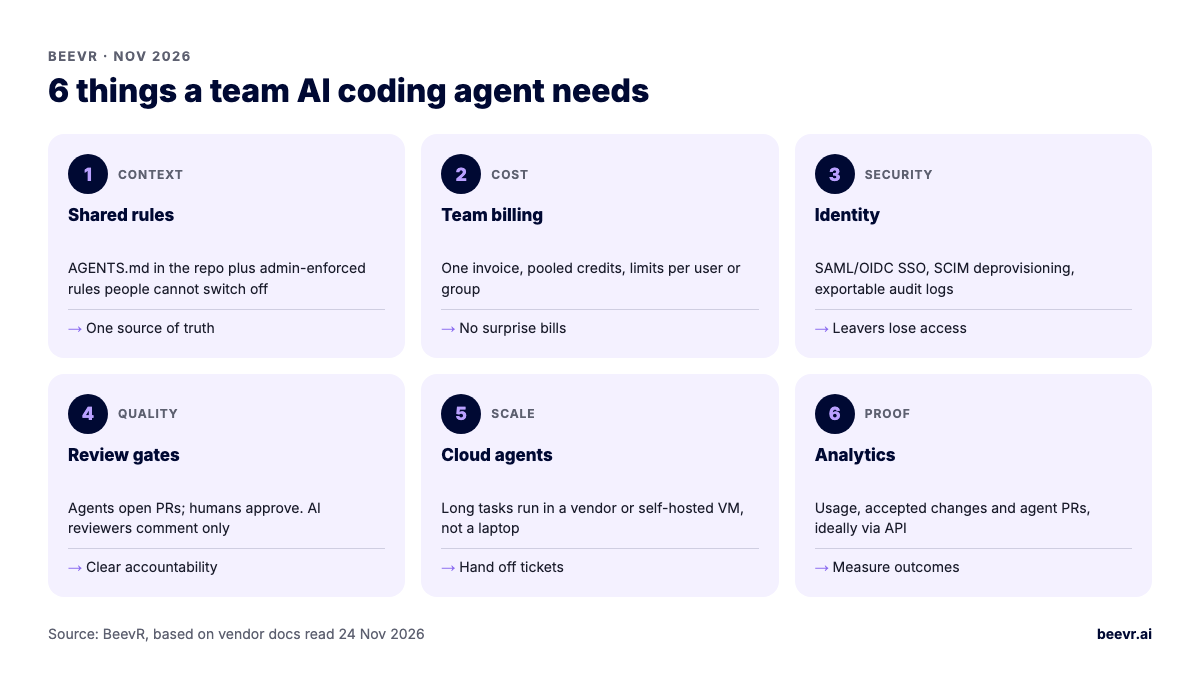
Six capabilities separate a team product from a personal one: rules that live in the repo and are enforced centrally, pooled billing with per-person limits, SSO with SCIM deprovisioning and audit logs, review gates that keep humans as approvers, agents that run in the cloud, and analytics that show what the agents shipped.
- Shared context. A committed instructions file every agent reads, plus admin-enforced rules that individuals cannot switch off.
- Team billing. One invoice, pooled credits, and spend limits per user or group.
- Identity. SAML or OIDC SSO, SCIM so leavers lose access the day HR offboards them, and exportable audit logs.
- Review workflow. Agents open pull requests; humans approve. AI reviewers comment but do not count as approvals unless you choose that.
- Cloud agents. Long tasks run in a vendor or self-hosted VM, not on a laptop that goes to sleep.
- Analytics. Seat usage, accepted changes and agent PRs, ideally through an API you can feed into your own dashboards.
The rest of this guide checks each item against vendor documentation.
How do shared rules files like AGENTS.md and CLAUDE.md work across tools?
AGENTS.md is now the common format: Codex, Copilot, Cursor, Devin, Kiro and Factory read it natively, and Claude Code reads it when no CLAUDE.md exists. Each tool still has its own file for richer rules, so most teams keep one AGENTS.md as the source of truth and small tool-specific files that point to it.
The AGENTS.md site says the format is "stewarded by the Agentic AI Foundation under the Linux Foundation". Where each tool looks:
| Tool | Native rules file | Reads AGENTS.md? | Admin-enforced layer |
|---|---|---|---|
| GitHub Copilot | .github/copilot-instructions.md, .github/instructions/*.instructions.md | Yes, nearest file wins; also root CLAUDE.md/GEMINI.md | Organisation custom instructions |
| Cursor | .cursor/rules/*.mdc | Yes, nested | Team Rules in dashboard (Teams/Enterprise) |
| Claude Code | CLAUDE.md, .claude/rules/*.md | Fallback when no CLAUDE.md (v2.1.277+) | Managed CLAUDE.md and managed settings |
| OpenAI Codex | AGENTS.md (32 KiB default cap) | Yes, native | Managed configuration (Enterprise) |
| Devin | AGENTS.md, playbooks | Yes (16 KiB per file) | Enterprise-scoped playbooks |
| Kiro | .kiro/steering/ | Yes, always loaded | Steering files pushed by MDM |
Sources: GitHub custom instructions, Cursor rules, Claude Code memory, Codex AGENTS.md, Kiro steering.
Two practical rules. Keep the file short and factual: build commands, test commands, folder map, forbidden actions. And review changes to it like code, because a line in AGENTS.md changes the behaviour of every agent on every branch.
How much do team plans for AI coding agents cost per seat in 2026?
Standard team seats cost $19–$30 per user per month on monthly billing: Copilot Business $19, Claude Team and Codex Business $25 ($20 annual), Kiro $20 and Cursor Teams from $30. Usage on top is billed from pooled credits, and heavy agent users usually need a premium seat or overage.
| Product | Team tier price | Usage model | Spend controls |
|---|---|---|---|
| GitHub Copilot Business | $19/seat/month (Enterprise $39) | 1,900 AI Credits per user/month, pooled org-wide; overage $0.01/credit | Admin usage limits; overage on/off |
| Cursor Teams | $30+/user/month | Pooled usage; third-party models billed separately | Group spend limits on Enterprise |
| Claude Team | $25 standard / $125 premium per seat monthly ($20 / $100 annual), 2–150 seats | Seat usage limits; premium = 5x | Spend controls |
| Claude Enterprise | $20/seat/month annual, 20-seat minimum | Usage at API rates | Spend controls, audit logs |
| ChatGPT Business (Codex) | $25 standard / $125 premium monthly ($20 / $100 annual) | Shared ChatGPT + Codex limit from December; add-on credits | Spend controls |
| Devin Teams | $80/month per team (up to 100 users) | Shared credit pool | Session spending limits; budgets on Enterprise |
| Kiro teams | $20/seat/month | 500 pooled credits per seat; $0.04 per extra credit | Per user, group or profile limits |
| Factory Teams | $60/month per team + $40/seat (up to 10 seats) | Not confirmed | Admin controls on Business |
Sources: GitHub Copilot plans, Cursor pricing, Claude pricing, ChatGPT Business pricing, Devin pricing, Kiro pricing, Factory pricing, all read 24 November 2026. The seat line is rarely the big number. Our AI running-cost guide explains how agent usage outgrows seat fees.
Which AI coding agents support SSO, SCIM and audit logs, and on which tier?
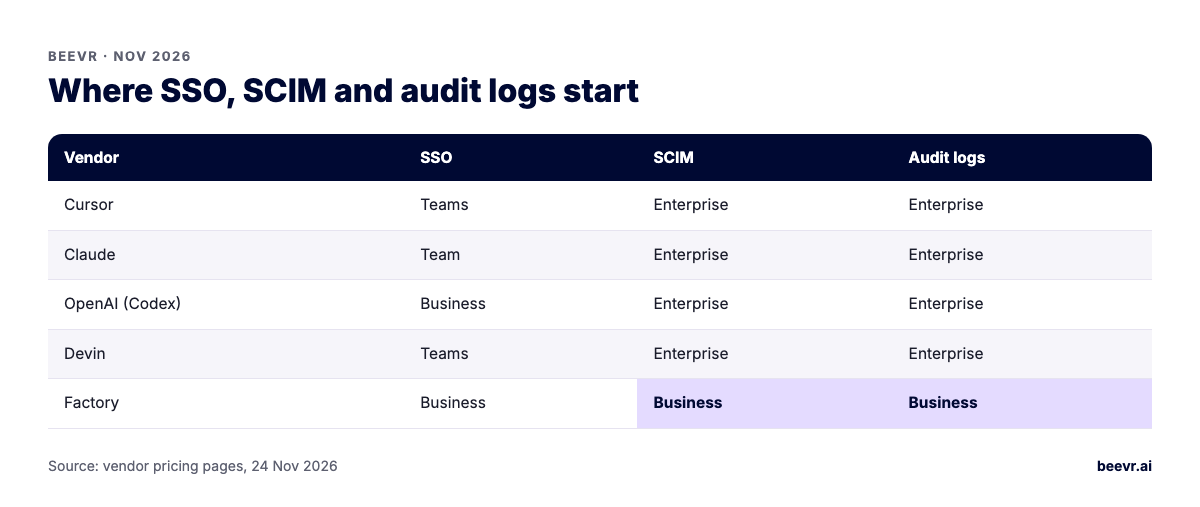
SSO is standard on team tiers at Cursor, Anthropic, OpenAI, Devin and Kiro. SCIM and audit logs are usually Enterprise-only: that is the case at Cursor, Anthropic, OpenAI and Devin. Factory includes SAML, SCIM and audit logging on its Business tier.
- Cursor: SAML/OIDC SSO on Teams; SCIM, audit logs, service accounts and repository, model and MCP access controls on Enterprise.
- Claude: SSO on Team; SCIM, audit logs and custom data retention on Enterprise. Managed settings can be pushed from the admin console.
- OpenAI: SAML SSO on Business; SCIM, key management, RBAC and the Compliance API (audit logs) on Enterprise.
- Devin: SSO on Teams; SCIM, RBAC and an audit-log API on Enterprise.
- Kiro: sign-in through IAM Identity Center, Okta or Entra ID.
- GitHub Copilot: identity follows your GitHub organisation or Enterprise Cloud. We could not confirm a tier-by-tier table on the pages we read.
If you have more than about 30 engineers or any regulated customers, budget for the Enterprise tier. SCIM is what stops a leaver's agent session from living on. Our AI coding agent governance guide covers model allow-lists and retention in detail.
Can an AI code reviewer approve a pull request?
Usually not by default. Copilot code review does not count toward required approvals unless an admin turns that on. Claude Code Review and Cursor Bugbot comment but do not approve or block on their own. Kiro's cloud agent has no merge rights. Factory's review "approves when it finds nothing", which teams should change.
- Copilot code review costs about $0.25 (Lite), $1.50 (Balanced) or $10 (Max) per review on average, plus Actions minutes. A new push dismisses a Copilot approval (docs).
- Claude Code Review runs several agents and a verification step, configured with
REVIEW.md; Team and Enterprise, GitHub only, not available with zero data retention (docs). - Cursor Bugbot posts a neutral status check unless "fail on unresolved" is on, and works with GitHub, GitLab, Bitbucket and Azure DevOps (docs).
- Codex code review runs on
@codex reviewor automatically and flags only P0 and P1 issues.
Our rule: AI review is a first pass that runs on every PR; a human with context is the approver. That keeps accountability where auditors and customers expect it. We explain why in our look at AI coding agent productivity research, where review capacity is the real bottleneck.
Which AI coding agents run in the cloud instead of on a developer's laptop?
Copilot's cloud agent, Cursor Cloud Agents, Claude Code on the web, Codex cloud tasks, Devin and Kiro Web all run tasks in remote VMs and open pull requests. Claude Code also supports a self-hosted environment. Cloud agents are what let a team hand off tickets and review results later.
- Copilot cloud agent: new experience from 28 October 2026 on paid plans; sessions in GitHub Actions are limited to 59 minutes; rulesets can block it from opening PRs (docs).
- Cursor Cloud Agents (formerly background agents): isolated VMs, started from web, desktop, Slack, GitHub, Linear or API; Premium tier and up.
- Claude Code on the web: Anthropic-managed or self-hosted VMs, started with
claude --cloud; an admin can switch cloud sessions off org-wide. - Codex cloud tasks: on Plus, Pro, Business and Enterprise, not with an API key.
- Kiro Web: triggered by a
kirolabel on a GitHub issue; it "cannot bypass branch protection rules".
One caution: running in the cloud moves your code and secrets into a vendor environment. Check what network access the VM has and which secrets it can read before you connect production repos. Our guide to terminal AI coding agents covers the local sandbox side.
How do you measure whether a team AI coding agent is working?
Use the vendor's analytics for adoption and output, then join it with your own delivery data. Copilot, Cursor, Claude Code and Codex all offer dashboards; Copilot's metrics API and Claude's Enterprise Analytics API let you pull the data into your own reporting. Measure lead time and defect rates, not lines written.
- GitHub Copilot usage metrics have been GA since 27 February 2026, with org and enterprise APIs. Since October the API also reports usage from other agents, including Claude Code and Codex.
- Cursor shows the AI share of committed code and Cloud Agent PRs on Teams; the Analytics API is Enterprise-only.
- Claude Code has a Team/Enterprise dashboard with PR and line contribution through its GitHub app (beta) and CSV export (docs).
- Codex has a workspace analytics dashboard and an Analytics API that needs an admin key.
Do AI coding agents train on your team's code?
Not on business tiers by default. Claude Team and ChatGPT Business state no training on your data by default, Cursor does not train on data when Privacy Mode is on, and Copilot Business and Enterprise data is covered by GitHub's Data Protection Agreement. Zero data retention is narrower: Anthropic offers it only to qualified Enterprise accounts, and it switches off cloud sessions.
Individual plans are different. GitHub says Pro, Pro+ and Max data may be used for training unless the user opts out. That is one more reason not to let engineers expense personal plans for company code. Cursor states it has zero data retention agreements with all its model providers and lets admins enforce Privacy Mode for the whole team (Cursor data use).
How BeevR builds this
BeevR is a senior, founder-led software and AI studio in Hanoi. Our own team works with coding agents every day under the rules in this article: one shared AGENTS.md per repo, agents that open PRs but never approve them, budgets per project and attribution on every commit. When we help a client team adopt agents, we deliver it as one fixed-scope phase: tool selection against your identity and data requirements, rules files, managed settings as code, review gates and an analytics view joined with your delivery metrics. You get a working demo every Friday and own all code and configuration from day one. Phases are priced from $10K, with no per-user fees.
If you want an outside AI agent development team to set this up, or to build product features with you while your team learns the workflow, book a 30-minute call.