To build a ChatGPT plugin for your SaaS in 2026, you put a remote MCP server in front of your product, add OAuth if users need their own data, optionally add a UI panel, and submit the package through OpenAI's plugin portal for review. Since DevDay on 29 September 2026, plugins can also live in the ChatGPT sidebar, open beside a conversation, act as file viewers, and trigger automations through MCP Events. The same listing appears in ChatGPT and Codex, and OpenAI's always-on Dots agents reach apps through plugins. A read-only plugin over public data is two to three engineer-weeks. An authenticated plugin with UI and event-triggered automations is two to three months. This guide covers the architecture, every step, what review checks, what it costs, and what we found when we checked our own MCP servers against OpenAI's requirements. Updated October 2026.
What changed for ChatGPT plugins at DevDay 2026?
Plugins went from tools the model calls in the background to app-like features inside ChatGPT. At DevDay on 29 September 2026, OpenAI announced:
- Plugin extensions. A plugin can have a home in the ChatGPT sidebar, open interactive panels next to a conversation, and act as a viewer or editor for your file types.
- MCP Events. ChatGPT supports the proposed MCP Events specification, so a plugin can start an automation when something happens in your product, such as a new ticket or comment.
- A new submission flow. Plugin Creator for building, a redesigned review flow with clearer feedback, and better ranking and recommendation in the directory.
- Dots. Always-on agents that, according to OpenAI, "can readily connect to over 4,000 apps" through the plugin ecosystem.
OpenAI's DevDay recap puts ChatGPT at 1.2 billion weekly users, its own figure. A listing is not the same as being found, as the review section explains, but the plugin is now how your product shows up when a customer, or their agent, works inside ChatGPT.
What is a ChatGPT plugin made of?
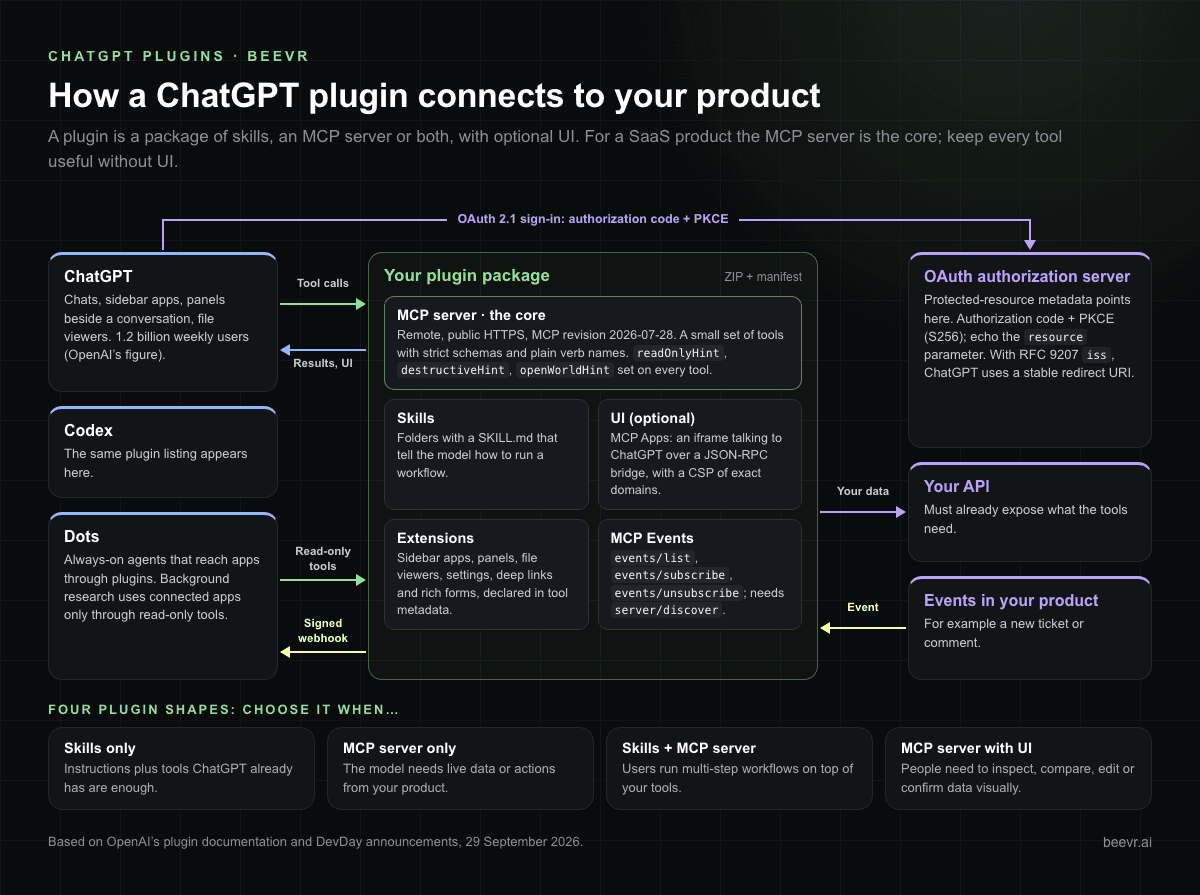
A plugin is a package that contains skills, an MCP server, or both, with optional UI on top of the server. OpenAI's documentation describes four shapes:
| Shape | What it contains | Choose it when |
|---|---|---|
| Skills only | Folders with a SKILL.md and supporting files that tell the model how to run a workflow | Instructions plus tools ChatGPT already has are enough. No access to your product is needed. |
| MCP server only | A remote MCP server exposing your product's tools, with auth | The model needs live data or actions from your product. |
| Skills and MCP server | Workflow instructions that use your MCP tools | Users run multi-step workflows, such as "prepare the monthly report", on top of your tools. |
| MCP server with UI | The above plus UI resources rendered in ChatGPT | People need to inspect, compare, edit or confirm structured data visually. |
For a SaaS product, the MCP server is the core. It defines which tools exist, their input and output schemas, who may call them, and what data they return. UI is optional, and OpenAI's guidance is to keep every tool useful without it, so agents such as Dots can run the same workflow headlessly. If you have not built an MCP server before, start with our MCP server development guide. It covers the protocol, OAuth 2.1 architecture and security in depth, so this article focuses on what is specific to ChatGPT.
How do you build a ChatGPT plugin step by step?
Nine steps take you from idea to a published listing:
- Pick three to five use cases. Write them as things a user would say in ChatGPT, such as "show me overdue invoices for Acme". These become your tools and, later, your review test cases.
- Build the remote MCP server. Use a public HTTPS domain, a small set of tools with strict schemas and plain verb names like
get_order_status, and target the current MCP revision (2026-07-28). MCP Events requires it. - Add authentication. Publish OAuth protected-resource metadata on your MCP server and point it to your authorization server. ChatGPT runs the authorization-code flow with PKCE (
S256) and sends aresourceparameter you must echo. It prefers Client ID Metadata Documents and also supports dynamic client registration or a predefined client. Declare auth per tool withsecuritySchemes, so public tools work before the user links an account. - Allow the right redirect URI. If your authorization server supports RFC 9207 issuer identification (it returns
issin every authorization response), ChatGPT uses a stable redirect URI. Otherwise it uses a callback-specific one. Copy the exact value from the plugin's management page into your allowlist. - Annotate every tool. Set
readOnlyHint,destructiveHintandopenWorldHintto explicit true or false values. Review checks that they match real behaviour. Annotations also inform client safeguards: Dots' background "proactive research" uses connected apps only through read-only tools. - Add UI only where it helps. ChatGPT implements the open MCP Apps standard. Your server links a tool to a UI resource, and the UI runs in an iframe that talks to ChatGPT over a JSON-RPC bridge. Define a content security policy that lists the exact domains the component fetches from.
- Add extensions. Sidebar apps, conversation panels, file viewers, plugin settings, deep links and rich forms are declared in a few lines of tool metadata through OpenAI's MCP extensions SDK.
- Add MCP Events if users should be able to say "when X happens in your product, do Y". The next section covers what this takes.
- Package, test and submit. Test in ChatGPT with a custom connection, bundle the plugin as a ZIP with its manifest, upload it in the portal, fix automated findings, then submit for review.
For enterprise buyers, also return a verified email through OpenID Connect. ChatGPT Enterprise uses it to stop a corporate identity linking your plugin in a personal workspace.
How do MCP Events work, and what do they take to build?
MCP Events lets ChatGPT subscribe to things that happen in your product and act on them, even when the user is away. For example, "watch this document for review comments and apply the edits". It works in Work chats and with Dots, and it is the most backend-heavy part of a plugin.
Your server advertises events in its server/discover capabilities and implements three methods on the same authenticated endpoint as your tools:
events/listdescribes each event, its filters and its payload schema.events/subscribecreates or refreshes a subscription. ChatGPT supplies a callback URL and a signing secret.events/unsubscribestops it.
Then your server POSTs one signed event per request to the callback when something matches. The production details are what take time:
- Durable subscription storage that survives restarts, with owner, filters, callback URL, secret and expiry.
- Authorisation at subscribe time and during the subscription. Check the user may see the event, and stop delivery if their access is revoked.
- Callback verification with a single-use challenge before any data is sent.
- SSRF protection. HTTPS only, resolve and validate the destination address, block private and local addresses, and do not follow redirects.
- Signing with Standard Webhooks headers, payloads up to 256 KiB, retries with backoff that keep the same event ID, and no retries on
410or413. - Idempotent write tools, because events can arrive out of order and an automation may act twice.
OpenAI's integration supports webhook delivery only, not polling or streaming. Its documentation also warns you to treat comments and other user-written text in events as data, not instructions. That matters, because an event-triggered automation is an agent acting on text written by someone else. Our AI agent security checklist covers the controls around that.
What does OpenAI's review check before a plugin goes live?
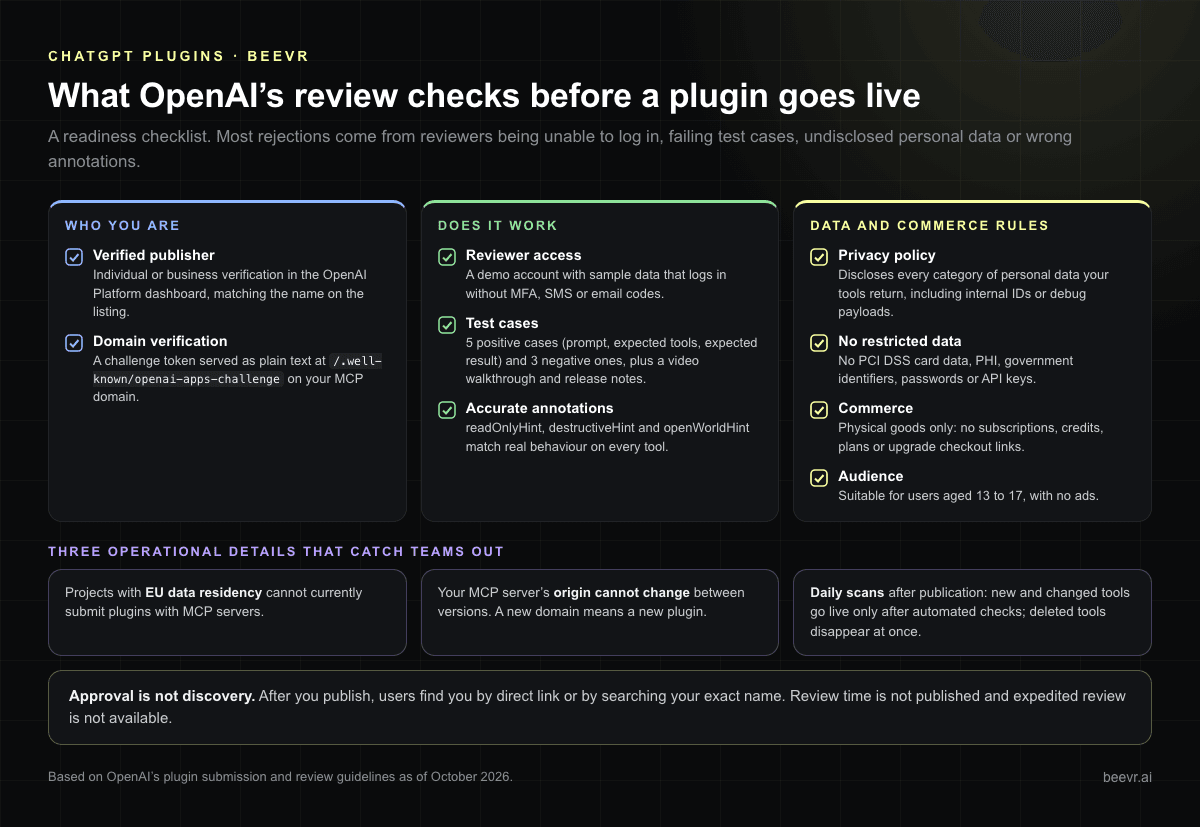
Review checks who you are, whether the plugin works, and whether it follows OpenAI's data and commerce rules. Use this as a readiness checklist:
- Verified publisher. Individual or business verification in the OpenAI Platform dashboard, matching the name on the listing.
- Domain verification. A challenge token served as plain text at
/.well-known/openai-apps-challengeon your MCP domain. - Reviewer access. A demo account with sample data that logs in without MFA, SMS or email codes.
- Test cases. Five positive cases (prompt, expected tools, expected result) and three negative cases where the plugin should decline or ask for clarification, plus a video walkthrough and release notes.
- Privacy policy that discloses every category of personal data your tools return. Review flags fields such as internal IDs or debug payloads that are not disclosed.
- Accurate annotations on every tool, as above.
- No restricted data. Plugins must not collect or process payment card data covered by PCI DSS, protected health information, government identifiers, or passwords and API keys.
- Commerce rules. Commerce is limited to physical goods. A plugin cannot sell subscriptions or credits, show plans or link to an upgrade checkout, though existing paying users can sign in and use what they already have.
- Audience. Suitable for users aged 13 to 17, with no ads.
Three operational details catch teams out. Projects with EU data residency cannot currently submit plugins with MCP servers. Your MCP server's origin cannot change between versions, so changing domain later means a new plugin. And after publication OpenAI scans your server daily: new and changed tools go live only after automated checks pass, while deleted tools disappear at once.
Finally, approval is not discovery. After you publish, users find you by direct link or by searching your exact name. The directory's main pages and proactive suggestions are for plugins OpenAI selects for strong utility and satisfaction, and you cannot request that placement.
Can a healthcare or fintech SaaS ship a public ChatGPT plugin?
Yes, but not over the regulated data itself. OpenAI's guidelines bar public plugins from processing PHI and PCI-scoped card data. A healthtech or fintech product can still publish a plugin for scheduling, general product information, de-identified analytics or other non-regulated features. For workflows that touch regulated data, a private custom MCP connection inside a customer's workspace is the right route, with the model endpoint, contracts and audit trail scoped like the rest of your compliant system. Our guides to HIPAA-compliant AI agents and the fintech PCI DSS and SOC 2 checklist cover that side.
How much does it cost to build a ChatGPT plugin?
Most of the cost is in authentication, events and review readiness, not the protocol. The table converts effort into money at two rate bands already published on our site: the senior Asia rate of $31–$41 an hour from our 2026 Vietnam rates guide, and the $100–$300 an hour typical of US mid-market firms.
| Plugin scope | What's included | Effort (senior engineer-weeks) | At $31–$41/h | At $100–$300/h |
|---|---|---|---|---|
| Read-only, public data | MCP server with 5–10 tools, annotations, package, test cases, video, privacy review | 2–3 | $2.5K–$4.9K | $8K–$36K |
| Authenticated, read-only | Above plus OAuth 2.1 with PKCE, protected-resource metadata, client registration, per-tool auth, demo tenant | 4–7 | $5K–$11.5K | $16K–$84K |
| Authenticated with UI | Above plus MCP Apps UI, sidebar or panel extension, content security policy, UI testing | 6–10 | $7.4K–$16.4K | $24K–$120K |
| Write tools and MCP Events | Above plus write scopes, confirmations, idempotency, subscription store, signed webhooks, SSRF guard, abuse testing | 8–14 | $9.9K–$23K | $32K–$168K |
These are our planning estimates, not quotes. They assume your API already exposes what the tools need and that the team knows OAuth. If your API does not exist yet, that work comes first, and our AI app development cost guide covers it. Review time is not in the table, because OpenAI says timelines vary and expedited review is not available. Plan for at least one round of feedback.
What did we find when we checked our own MCP servers against the plugin requirements?
Three gaps, which are probably typical for servers built in 2025 or early 2026. BeevR runs three MCP servers: beevr.ai/mcp and ecocheck.ai/mcp (public, read-only) and ecocheck.ai/mcp/account (a customer's own data, OAuth 2.1 with PKCE). On 7 October 2026 we compared them with OpenAI's current plugin documentation:
- No tool annotations (fixed the same day). Both public servers returned tools without
readOnlyHint,destructiveHintoropenWorldHint. Every tool is read-only, so the fix was one line per server: all three servers now declarereadOnlyHint: true,destructiveHint: false,idempotentHint: trueandopenWorldHint: falseon every tool. - No MCP Events support. Our servers still negotiate the older handshake-based protocol revisions and do not implement
server/discover, which MCP Events needs. - The redirect allowlist needs updating. The account server's client registration allows ChatGPT's stable redirect URI. Our authorization-server metadata does not advertise RFC 9207 issuer identification, so under the current docs ChatGPT would use a callback-specific redirect instead. Our authorization response comes straight from Amazon Cognito, so adding
isswould mean proxying both the authorize and token steps. We chose the simpler route OpenAI documents: copy the exact redirect from the plugin's management page into the allowlist when we register the plugin.
What already fits: protected-resource metadata, a 401 challenge that names the metadata and scope, S256 PKCE only, public clients, short-lived tokens with revocation, and read-only access enforced in the backend API rather than the MCP layer. If you are starting fresh, building to the 2026-07-28 revision and the OpenAI docs from day one avoids all three gaps.
FAQ
Is a ChatGPT plugin the same as an MCP server?
Not quite. The MCP server is the part that connects ChatGPT to your product. The plugin is the package you submit and users install, and it can also include skills, UI and metadata. A plugin can even be skills-only with no server.
Do I need a custom UI for my ChatGPT plugin?
No. UI is optional, and many good plugins return structured results only. Add UI where people need to compare, edit or confirm something visually, and keep every tool working without it so agents can use it in the background.
How long does ChatGPT plugin review take?
OpenAI does not publish a timeline and does not accept requests to speed up review. Most rejections come from reviewers being unable to log in, failing test cases, undisclosed personal data or wrong annotations, so get those right before you submit.
Will my plugin work with OpenAI Dots?
Dots use the plugins a user has connected, so a published plugin is how your product becomes reachable to them. MCP Events also works with Dots. Correct read-only annotations matter, because Dots' background research uses connected apps only through read-only tools.
Can the same MCP server work in Claude and ChatGPT?
Yes. Both are MCP clients, and ChatGPT's UI is built on the open MCP Apps standard. Our EcoCheck account server already allows redirect URIs for both clients. Host-specific extras, such as ChatGPT sidebar extensions, need extra metadata but do not break other clients.
BeevR builds production MCP servers and the plugins on top of them, with OAuth, audit and review readiness designed in, a fixed price per phase and full code ownership from day one. See our AI agent development work or tell us what you want ChatGPT users to do with your product.